The Anatomy of an Agent: What's Actually Inside These AI Systems Everyone's Talking About
A leaked Signal chat, a personal AI project, and a viral open-source agent with 180k GitHub stars. Together they reveal what an agentic system actually consists of and why the same architecture powers both a personal assistant and an enterprise platform.
The Signal Chat That Caused Major Embarrassment
In March 2025, Pete Hegseth, the US Secretary of Defense, shared classified war plans for strikes on Yemen's Houthi rebels. Not through the Pentagon's secure communication systems. Not via encrypted military channels. Through a Signal group chat.
The story only became public because Jeffrey Goldberg, editor-in-chief of The Atlantic, had been accidentally added to the group. He watched in real time as senior officials discussed targets, timing, and weapon systems in what was essentially a WhatsApp-style conversation thread.
The immediate reaction focused on the security breach. Congressional hearings. Calls for resignation. The usual political theatre.
But that missed the more interesting point entirely.
The most consequential military decisions of that week were being made in a chat app. Not because anyone was being reckless, but because that's how decisions actually get made. The formal systems - the classified networks, the structured briefing protocols, the official channels were too slow, too cumbersome, or too disconnected from the people who needed to be in the room.
This isn't an anomaly. It's how the world actually works.
Chat Is Where Decisions Happen
Think about your own life for a moment. Where do your actual decisions get made?
The WhatsApp group where you coordinate the school run. The family group chat where holiday plans come together through a messy thread of messages, photos, and voice notes. The Slack channel where your team debates a product decision that the Jira ticket will never capture. The Teams thread where the real reasoning behind a budget approval (or rejection!) lives... reasoning that the formal approval system reduces to a single (hopefully) "Approved" checkbox.
Every organisation, every family, every group of humans runs on two versions of reality: the official record (forms filled, workflows completed, approvals logged) and the actual process (conversations, context, reasoning, judgment). I am going to explore this duality in depth in a companion piece I'm working on about how AI is changing the business-IT interface, but the point here is simpler.
If you're building AI systems that help people make decisions, you need to meet them where they actually are. Not in a bespoke enterprise portal. Not behind a login screen nobody remembers the password for. In their chat channels. On their phones. Through voice. Wherever the actual process happens.
This is exactly what agentic systems are being built to do. And understanding what's inside them matters, whether you're evaluating one for your business, building one yourself, or just trying to make sense of the hype.
I've Been Building This Since Last Year
In October 2025, I wrote a post about building a Personal Consultant AI System — a multi-agent infrastructure managing my daily operations, finances, health tracking, and productivity workflows. At the time, it was a niche pursuit. Personal AI systems were something a handful of enthusiasts were experimenting with, not something mainstream tech culture was paying attention to.
That changed fast. Throughout 2025, every major AI company declared it the "year of agents", but the reality was narrower than the hype. Most of what shipped was focused on coding: AI that could write, debug, and refactor software. Impressive, but niche. The explosion came in early 2026 when the realisation hit that these same architectures could handle general-purpose tasks, managing your calendar, coordinating across tools, making decisions with real-world context. Suddenly "agentic" went from a developer buzzword to something everyone was talking about.
My system had grown too, from the original 15 agents to a skill-based architecture with 20+ specialised capabilities, hooks for deterministic guardrails, a memory system for cross-session learning, and integrations spanning Gmail, calendar, accounting software, health APIs, and location tracking. I'd learned a huge amount about what works and what doesn't when you try to build something that actually runs your life, rather than just a chatbot answering questions.
Then OpenClaw happened, and I realised my personal system wasn't just a hobby project, it was a microcosm of what every business would need.
The OpenClaw Phenomenon
The story starts with Clawdbot — a personal AI assistant built by Pete Steinberger, originally as an always-on WhatsApp bot. He shared the architecture on social media. People loved it. He open-sourced it. Then renamed it, first to Moltbot and then to OpenClaw — and it exploded.
At the time of writing, OpenClaw has over 180,000 stars on GitHub. To put that in perspective, that makes it one of the most popular open-source projects of the past year.
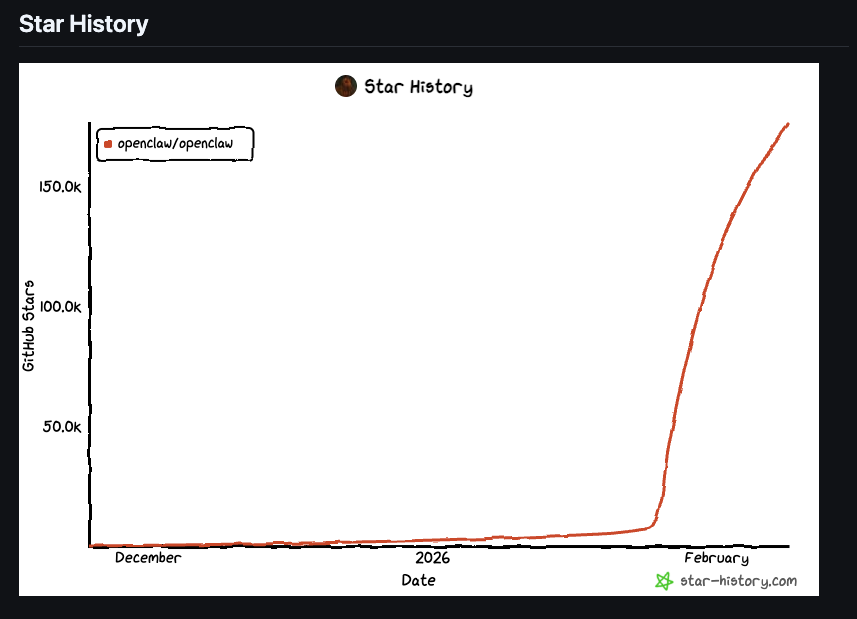
On the surface, it looks like a personal tool. A WhatsApp bot that manages your calendar, remembers your preferences, and helps with daily tasks. The kind of thing you'd show a friend and they'd say "that's cool, but I'd never use it."
But look under the hood and something remarkable emerges.
OpenClaw contains every component that a business-focused agentic system would need. Identity management. Multi-channel communication across 14+ platforms. A sophisticated memory system with vector search. Scheduled tasks with cron-like precision. Browser automation. Voice interaction. A permission system with trust hierarchies. Observability and logging. A plugin ecosystem with community-contributed skills.
I've spent considerable time studying OpenClaw's architecture, mapping every component to both my personal system and to the enterprise architecture I'm building for risk management at risk-agents.com. What I found is that the components are identical. The only thing that changes is the context.
A personal assistant that reminds you to buy milk uses the same architectural bones as an enterprise system that monitors credit risk across a portfolio.
Let me show you what those bones look like.
The Anatomy of an Agent
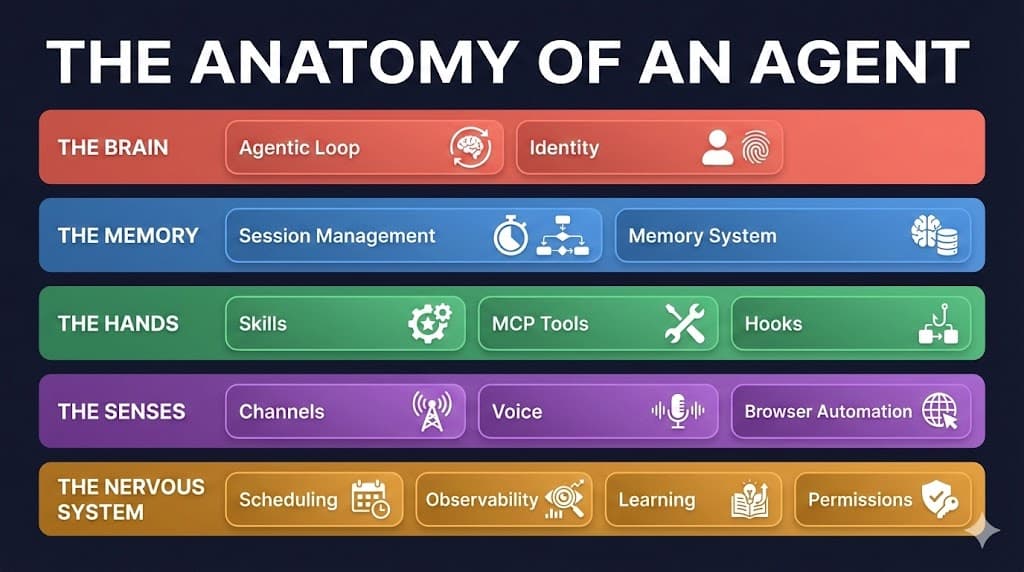
What follows is a breakdown of the key components that make up an agentic system. I've grouped them into five categories that I think make them intuitive: The Brain, The Memory, The Hands, The Senses, and The Nervous System.
For each component, I'll explain what it does in plain English, how it actually works, and why it matters whether you're building something personal or something for a large business.
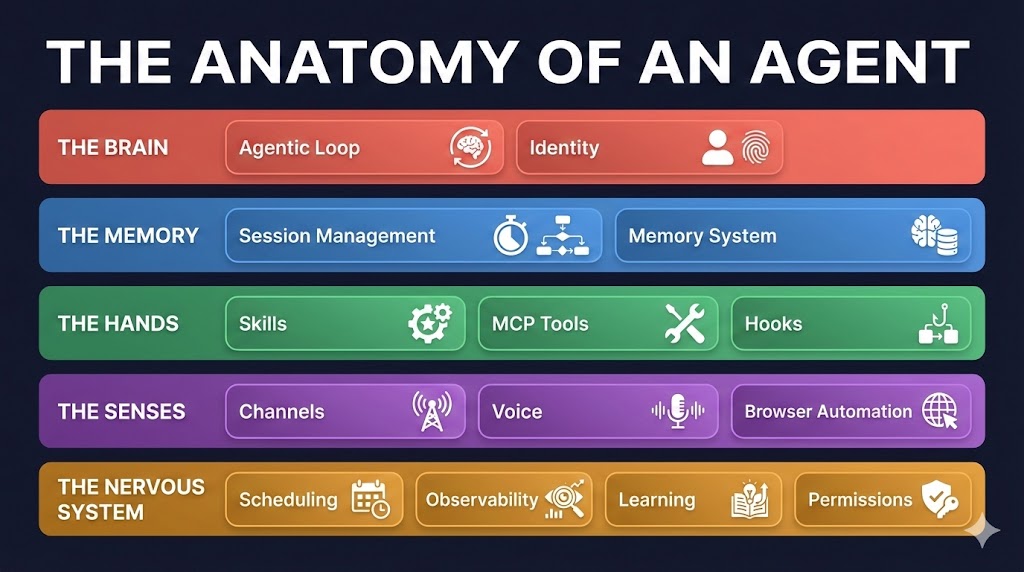
Five layers, fourteen components. Each one exists in personal tools like OpenClaw and my own system, and each has a direct equivalent in enterprise platforms. Let's look at what they do.
The Brain
The Agentic Loop
What it does: This is the engine. The core reasoning cycle that makes an agent an agent rather than just a chatbot. Without it, you have a model that takes a question and gives an answer. With it, you have a system that can think, act, observe the result, and decide what to do next — in a continuous loop until the task is complete.
How it actually works: The loop follows a simple pattern: Think → Act → Observe → Repeat. The model receives a prompt, decides what tool to use (read a file, search the web, call an API), observes the result, and then decides whether it has enough information to respond or needs to take another action. This is what lets an agent handle multi-step tasks like "find all overdue invoices and send reminder emails" — it breaks the task down and works through it step by step.
Concrete example: OpenClaw builds its agentic loop on top of pi-mono, an open-source coding agent framework. My personal system uses Claude Code's built-in loop. Both follow the same think-act-observe pattern. The runtime differs; the fundamental architecture doesn't.
Why it matters for business: When people talk about "agents" vs "chatbots," the agentic loop is the differentiator. A chatbot gives you one response. An agent works through a problem, using tools along the way, much like a human colleague would.
Identity
What it does: Identity defines who the agent is, who the user is, and what goals guide decision-making. Think of it as the agent's "soul", the values, personality, and context that shape every response.
How it actually works: Identity is typically stored in configuration files that load at the start of every session. This includes the agent's name and personality traits, the user's background and preferences, and crucially, the goals and objectives that should guide all decision-making. Without identity, every session starts cold, the agent doesn't know who it's talking to or what matters to them.
Concrete example: OpenClaw uses a set of workspace files called SOUL.md (personality and boundaries), IDENTITY.md (name and origin), USER.md (the user's mission and strategies), and AGENTS.md (operating procedures). My system uses a similar approach with a personal profile, goals defined using the Getting Things Done (GTD) Horizons of Focus framework, and active project context.
Why it matters for business: In an enterprise setting, identity extends to corporate goals, risk appetite, and departmental objectives. An agent helping a risk analyst should make different decisions than one helping a marketing team, not because the technology differs, but because the identity context shapes the reasoning. This is what I call Goal Alignment at risk-agents.com: embedding organisational purpose into every agent interaction.
The Memory
Session Management
What it does: Maintains context within and across conversations. Without it, every time you talk to the agent, it's meeting you for the first time.
How it actually works: Within a session, the agent maintains a context window, a rolling buffer of the conversation so far. But context windows have limits (even large ones eventually fill up). When that happens, a process called compaction kicks in: older parts of the conversation are summarised to make room for new information, preserving the essential details while discarding the noise. Across sessions, the system stores summaries and can resume previous conversations.
Concrete example: Claude Code writes session summaries continuously in the background — first at around 10,000 tokens, then every 5,000 tokens. When compaction triggers, it uses these pre-written summaries rather than re-reading the entire conversation, making the process nearly instant. OpenClaw takes a different approach with JSONL-based transcripts and configurable session reset policies (daily, idle-based, or manual).
Why it matters for business: In enterprise settings, session management becomes critical for long-running processes. A risk assessment that spans multiple days needs to maintain context across sessions. A client relationship that builds over months needs the agent to remember what was discussed in the last meeting.
Memory System
What it does: Long-term and short-term memory. How the agent remembers what you told it last week, what you prefer, and what it learned from past interactions.
How it actually works: Most systems use a two-tier approach. Short-term memory is the current conversation plus recent session summaries. Long-term memory is a curated store of important facts, decisions, and preferences that persists indefinitely. Retrieval uses a combination of keyword search (finding exact matches) and semantic search (finding conceptually similar information), often weighted together for best results.
Concrete example: OpenClaw maintains a MEMORY.md file for curated long-term facts and daily memory/YYYY-MM-DD.md files for session logs. Retrieval uses hybrid search: 70% vector similarity plus 30% keyword matching. Critically, before compaction happens, a silent "flush" triggers — the agent stores any durable memories before the context window clears. My system uses a similar pattern with a structured MEMORY/ directory containing work state, accumulated learnings, and session signals.
Why it matters for business: Enterprise memory extends beyond individual interactions. It becomes institutional knowledge — how decisions were made, why certain approaches were chosen, what precedents exist. This is the foundation of what I call Context Management: making organisational knowledge accessible to AI systems so they can reason with the full picture, not just today's inputs. I will be exploring this in a lot more detail in my follow-on blog post.
The Hands
Skills
What it does: Reusable capabilities that define what the agent can actually do. Skills are the building blocks — each one encodes a specific task or process that the agent can perform.
How it actually works: A skill typically contains instructions (a prompt telling the agent how to perform the task), workflows (step-by-step procedures), and often executable code (scripts that perform deterministic operations). Skills are loaded based on intent, the system matches what the user asks for to the relevant skill and loads its context. This keeps things efficient: you don't load financial analysis instructions when someone asks about the weather.
Concrete example: My system has 20+ skills covering everything from GTD task management to FreeAgent invoicing to parkrun performance tracking. OpenClaw has a public skill registry (ClawHub) with over 5,700 community-contributed skills. Both use the same core format: a skill definition file with metadata, workflow procedures, and supporting scripts.
Why it matters for business: Skills are the business logic layer of an agentic system. They're what transform a generic AI into something that understands your specific domain. For risk management, skills might include stress test generation, regulatory monitoring, or credit analysis. The key principle: code first, prompts second — use deterministic scripts wherever possible for reliable operations, and prompts for the parts that genuinely need judgment.
MCP Servers / Tools
What it does: External integrations that extend what the agent can interact with. If skills are the instructions, tools are the hands that actually touch the outside world.
How it actually works: The Model Context Protocol (MCP) is an open standard from Anthropic for connecting agents to external data sources and services. Each MCP server exposes tools that the agent can call, reading files, searching email, querying calendars, calling APIs. The agent's reasoning loop decides which tool to use and when, based on the task at hand. Tools can run locally (spawning a process on your machine) or connect to remote services.
Concrete example: My system connects to Gmail and Google Calendar via MCP servers, calls the FreeAgent API for accounting operations, queries Parkrun for fitness data, and accesses my Owntracks location server. OpenClaw supports a broader set of integrations through its plugin system, including image generation, browser automation, and device-level capabilities like camera access.
Why it matters for business: Tools are what make agents genuinely useful rather than just conversational. An agent that can talk about your CRM data is interesting. An agent that can query your CRM, update records, send follow-up emails, and schedule meetings is transformative. The MCP standard means these integrations work across different agent platforms - build once, use anywhere.
Hooks
What it does: Deterministic guardrails that fire regardless of what the AI decides. Unlike skills (which guide the AI) or tools (which the AI chooses to use), hooks are programmatic — they execute automatically at specific points in the agent's lifecycle.
How it actually works: Hooks trigger on lifecycle events: session start, before a tool executes, after a tool completes, before context compaction, session end, and more. They can inspect, validate, block, or augment what's happening. Crucially, they don't rely on the AI remembering to do something — they ensure it happens regardless.
Concrete example: In my system, a SecurityValidator hook inspects every Bash command before execution, blocking dangerous patterns. A LoadContext hook fires at session start to ensure my identity and project context is always loaded. An ExplicitRatingCapture hook detects when I rate the agent's performance, triggering the learning system. OpenClaw uses similar patterns with tool wrapper policies and exec allowlists.
Why it matters for business: In regulated industries, you can't rely on an AI model to always remember compliance rules. Hooks provide the guarantee. "Before any trade recommendation, always check against the sanctions list." "Before sending any external communication, always verify it's been reviewed." These are the kind of invariants that hooks enforce — deterministically, every single time.
The Senses
Channels
What it does: How agents connect to the outside world. The entry points through which humans interact with the system.
How it actually works: Each channel is an adapter that translates between a messaging platform's protocol and the agent's internal message format. A WhatsApp message, a Slack thread, a CLI command, and a web chat widget all look different on the outside but become the same thing internally: a message for the agent to process.
Concrete example: OpenClaw supports 14+ channels, WhatsApp, Telegram, Discord, Slack, Signal, iMessage, Google Chat, web chat, MS Teams, Matrix, and more. My system currently operates through CLI (Claude Code), a web UI, Telegram, and REST API. The architecture means adding a new channel doesn't require changing the agent — just adding a new adapter.
Why it matters for business: Remember the Hegseth Signal chat? Decisions happen where people are. An enterprise agent needs to be reachable where employees actually work... Teams, Slack, email, web portals. Multi-channel support isn't a nice-to-have; it's essential for adoption. The best agent in the world is useless if nobody can reach it.
Voice
What it does: Speech interaction... speaking to the agent and hearing it respond. Extends the agent beyond text-based channels.
How it actually works: Voice combines two capabilities: Speech-to-Text (STT) converts spoken input to text that the agent processes, and Text-to-Speech (TTS) converts the agent's text response to spoken audio. Modern implementations stream the audio for low-latency responses, so you're hearing the answer while the agent is still generating it.
Concrete example: OpenClaw supports full voice interaction with wake words ("Hey Claw"), streaming TTS via ElevenLabs, and Discord voice channel support with barge-in (you can interrupt mid-sentence). My system uses ElevenLabs TTS for on-demand voice output via a dedicated VoiceOutput skill.
Why it matters for business: Voice becomes critical for hands-free scenarios, a trader on the floor, a field inspector on-site, a doctor during a procedure. It also dramatically improves accessibility and reduces friction for quick interactions.
Browser Automation
What it does: Agents that can see and interact with web pages, navigating, clicking, filling forms, reading content, and taking screenshots.
How it actually works: The agent controls a browser instance through protocols like Chrome DevTools Protocol (CDP) or Playwright/Puppeteer. It can take a snapshot of the page (usually via the accessibility tree for efficiency), identify elements by their role and text, and interact with them programmatically.
Concrete example: OpenClaw's browser tool supports managed profiles (isolated from personal browsing), AI snapshots for precise element targeting, remote browser connections, and device emulation. Claude Code offers browser control through MCP servers. Both enable the agent to perform tasks on websites that don't have APIs - filling forms, extracting data, navigating dashboards.
Why it matters for business: Many enterprise systems are web-based but lack APIs. Browser automation lets agents interact with legacy systems, internal portals, and third-party platforms that would otherwise require manual human operation.
The Nervous System
Scheduling & Heartbeat
What it does: Enables proactive behaviour. Without scheduling, an agent only acts when you talk to it. With it, the agent can perform tasks on a timer, checking email every hour, running reports every morning, monitoring for anomalies continuously.
How it actually works: There are two patterns. Scheduled tasks (cron-style) fire at exact times in isolated sessions — "every Monday at 9am, generate the weekly risk report." Heartbeat is a softer, periodic wake-up that runs within the main session — "every 60 minutes, check if anything needs attention." The heartbeat has full conversational context, so it knows what you've been working on and can prioritise accordingly.
Concrete example: OpenClaw's heartbeat uses a HEARTBEAT.md checklist that the agent follows each cycle, with active-hours restrictions (no 3am wake-ups) and accountability-partner patterns that compare your current activity against your stated priorities. My system uses a scheduler service that triggers cron jobs across multiple projects.
For the risk management platform I'm building, the scheduler runs regulatory monitoring jobs, scanning for new PRA consultations, checking FCA announcements, and flagging upcoming reporting deadlines. These run on a self-hosted scheduler service, each job triggering the appropriate agent skill in its own isolated session.
Why it matters for business: The shift from reactive to proactive is what separates an AI tool from an AI colleague. A reactive agent answers your questions. A proactive one tells you "the quarterly risk report is due in three days, and I've noticed two data sources haven't been updated... should I follow up?"
Observability
What it does: Monitoring what agents are doing, capturing decision traces, and providing visibility into the reasoning behind every action.
How it actually works: As the agent works, it emits events - tool calls, decisions, errors, completions. These events flow to a central dashboard where you can see what happened, when, and why. The decision trace is particularly important: because AI reasoning is non-deterministic (the same input can produce different outputs), the trace is the only way to understand why the agent did what it did.
Concrete example: My system emits events via hooks to an observability dashboard. OpenClaw provides structured logging with configurable levels and optional OpenTelemetry integration for distributed tracing. Both capture the full chain of reasoning for post-hoc analysis.
Why it matters for business: In regulated industries, "the AI decided" isn't an acceptable explanation. You need decision traces that show what information the agent had, what tools it called, what reasoning it applied, and what output it produced. This is audit infrastructure and it's essential for any enterprise deployment.
Learning System
What it does: Self-improvement from mistakes. When the agent gets something wrong, the learning system captures what happened and feeds it back to prevent the same mistake recurring.
How it actually works: A three-stage pipeline. Signal capture (real-time): detecting when something went wrong through explicit feedback ("that was wrong"), implicit sentiment ("ugh, that's not what I meant"), or error events (tool failures, retries). Harvesting (periodic): extracting learnings from session transcripts and categorising them. Synthesis (cross-session): aggregating signals into patterns ("skill X fails 40% of the time on task Y") and generating actionable improvements.
Concrete example: In my system (based upon Daniel Miessler PAI here: https://github.com/danielmiessler/Personal_AI_Infrastructure), hooks capture both explicit ratings (I can rate the agent 1-10 mid-conversation) and implicit sentiment (frustration detection). These signals are periodically harvested into pattern reports that inform skill improvements. It's not perfect — learning systems are one of the least-mature components across the industry, but even basic feedback loops dramatically improve reliability over time.
Why it matters for business: Every enterprise deployment will encounter edge cases, misunderstandings, and failures. A learning system means the agent gets better over time and crucially, it gets better at your specific problems, not just general benchmarks.
Permissions & Security
What it does: Controls what the agent is allowed to do without asking first. The safety layer that prevents an agent from reading sensitive files, executing destructive commands, or accessing systems you didn't intend.
How it actually works: Permission systems typically operate as allow/deny lists that sit between the AI's intent and actual execution. Different modes provide different levels of autonomy: from "ask every time" (maximum safety) to "bypass permissions" (trusted environments). The permission system works alongside hooks for defence in depth - broad permissions handle category-level decisions while hooks catch specific dangerous patterns within allowed categories.
Concrete example: OpenClaw implements a trust hierarchy (Owner → Agent → Friends → Strangers → Unknown → Hostile), container-level sandboxing per session, and DM pairing codes for unknown senders. My system uses Claude Code's permission modes combined with a SecurityValidator hook that inspects every command for dangerous patterns.
Why it matters for business: Permissions are table stakes for enterprise deployment. Different users need different access levels. Client data needs isolation. Destructive operations need approval gates. Without a robust permission model, you don't have an enterprise product, you have a disaster waiting to happen.
Why This Matters
Every component I've described exists in a "personal" tool like OpenClaw. Every single one has a direct equivalent in enterprise systems. The architecture doesn't change. The context does.
| Personal Use | Business Equivalent |
|---|---|
| Personal profile & goals | Corporate identity & risk appetite |
| Daily journal notes | Meeting minutes & decision records |
| Health tracking skills | Risk analysis skills |
| Family WhatsApp integration | Enterprise Slack/Teams integration |
| Personal calendar management | Client relationship scheduling |
| Budget tracking | Financial reporting & compliance |
| Habit monitoring via heartbeat | Regulatory deadline monitoring |
| "What did I do yesterday?" | "What happened on this account last quarter?" |
When you deploy these components, they naturally organise into three layers and this is where the personal-to-business mapping becomes concrete:
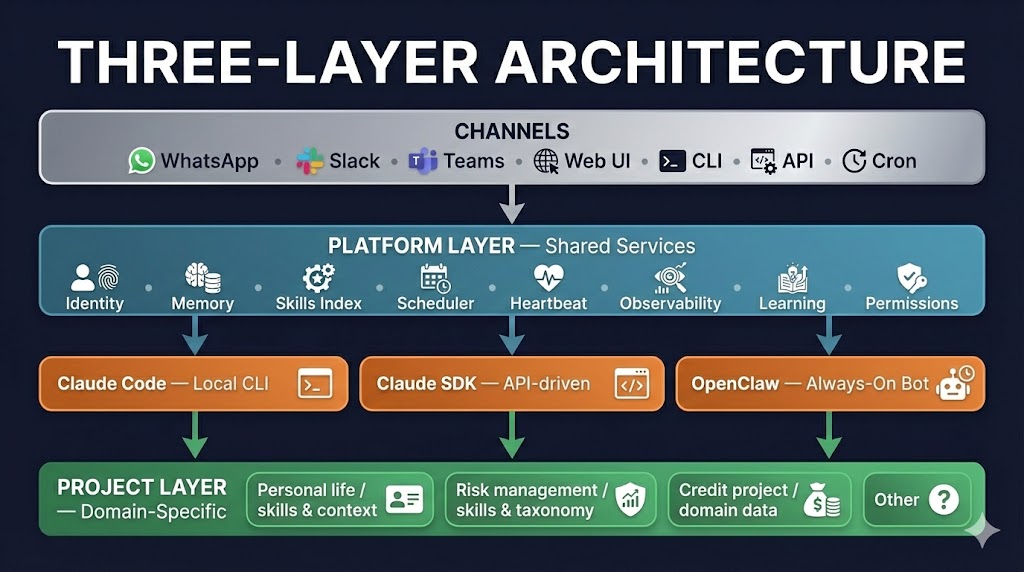
The platform layer provides the shared anatomy, the same Brain, Memory, Hands, Senses, and Nervous System serve every project. Different runtimes can coexist, each used where it excels. And the project layer is where context makes the difference: the same skill architecture holds GTD tasks, for personal use, in one project and risk taxonomies, for business use, in another.
The four innovations I'm building at risk-agents.com — Context Management, Skills, Patterns, and Goal Alignment — map directly to the components described here. Context Management is the memory system applied to organisational knowledge. Skills are business logic encoded as composable building blocks. Patterns are the workflow engine tracking which skill sequences form repeatable business processes. Goal Alignment is identity applied to corporate objectives.
The personal tools prove the architecture works. The business application is where it creates value at scale.
Conclusion
The Hegseth incident showed us something we already knew but rarely articulated: the real decisions happen in emails and chat channels, not formal systems. Agentic AI systems are being built to meet humans where they actually are, in their messaging apps, emails, their voice conversations, their browsers, their daily workflows.
Understanding what's inside these systems matters. Not because everyone needs to build one, but because whether you're evaluating an enterprise platform, adopting a personal tool, or making strategic decisions about AI investment, knowing the anatomy helps you ask the right questions. Does it have a memory system, or does every conversation start fresh? Can it connect to your existing tools, or is it a walled garden? Are there guardrails that work regardless of what the AI decides?
The building blocks are the same whether you're managing your personal productivity or running a risk function at a bank. I know because I'm doing both and the architecture I built for my life is the same architecture I'm building for business.
The components are all open, well-documented, and increasingly standardised. The barrier to entry has never been lower. The question isn't whether agentic systems are coming. It's whether you'll understand them well enough to use them effectively when they arrive.
This is the fourth post in my series about building with AI. Previous posts: Building a Personal Consultant AI System · Thames Water Monitoring Dashboard · Real-Time Energy Monitoring
I'm building an agentic platform for risk management at risk-agents.com. Connect with me on LinkedIn to follow the journey.
Related Articles

Building a Personal Consultant AI System - Architecture and Learnings
A deep dive into designing and implementing a production multi-agent AI system with Universal File Context architecture, managing daily operations and comprehensive life optimization.
Oct 21, 2025
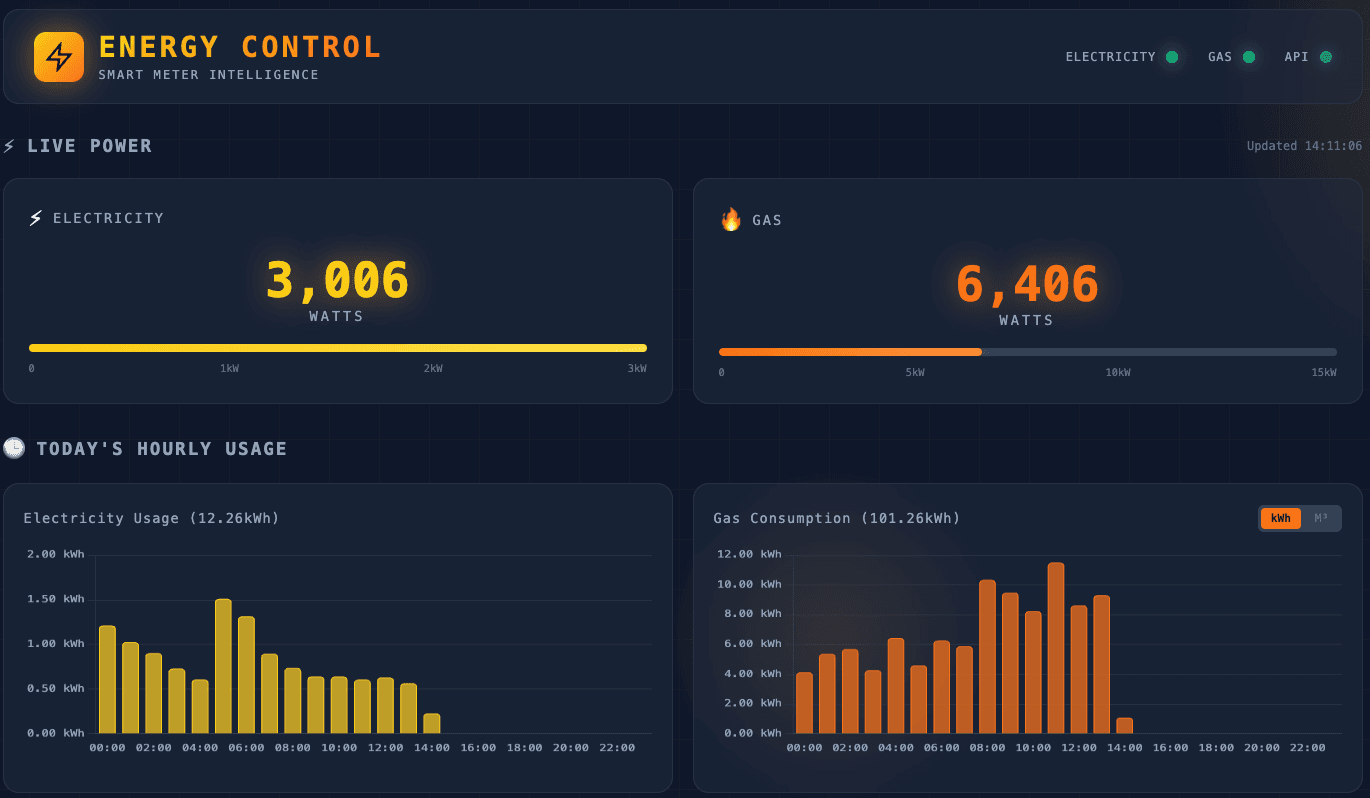
Building on Success: From Water Bills to Real-Time Energy Monitoring
Following the success of my Thames Water dashboard, I built a real-time energy monitoring system. This time with proper APIs, live data every 10 seconds, and years of historical consumption at my fingertips.
Dec 28, 2025
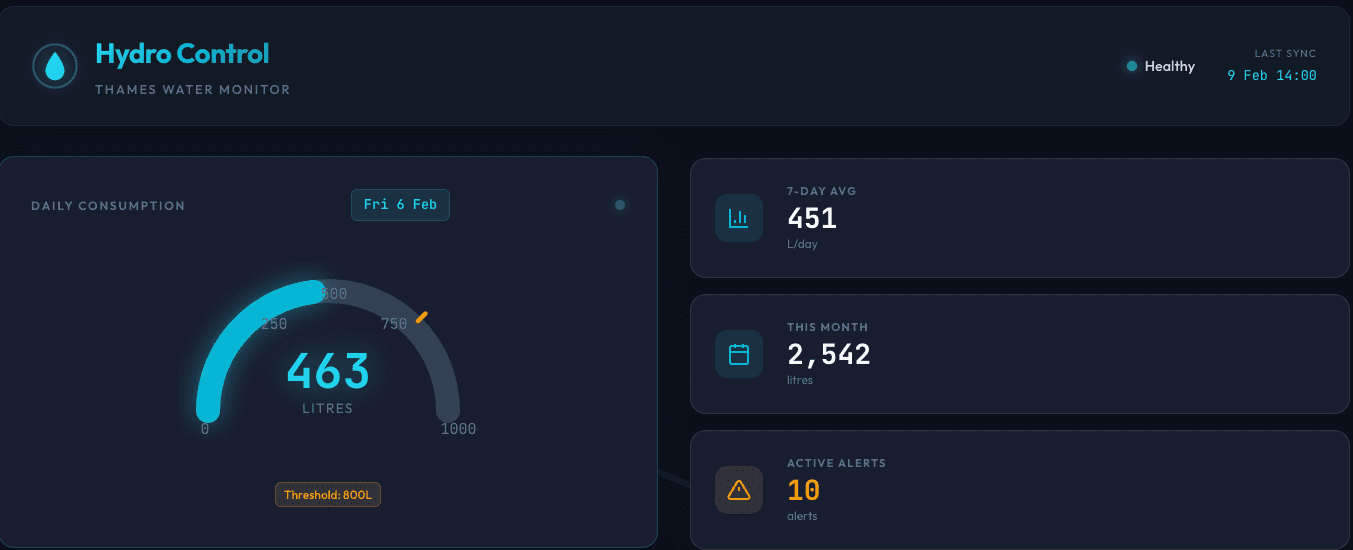
When Your Personal AI Consultant Helps You Think Bigger: From a crazy Water Bill to a Learning Opportunity
a shocking bill, a tendency to procrastinate, and a philosophy about keeping humans in the loop led me to build something far more valuable than I expected.
Dec 22, 2025